
Last updated on
Oct 31, 2026

Get the free New York Information Subpoena with Restraining Notice
We are not affiliated with any brand or entity on this form

Fill out
Complete the form online in a simple drag-and-drop editor.

eSign
Add your legally binding signature or send the form for signing.

Share
Share the form via a link, letting anyone fill it out from any device.

Export
Download, print, email, or move the form to your cloud storage.
Why pdfFiller is the best tool for your documents and forms


End-to-end document management
From editing and signing to collaboration and tracking, pdfFiller has everything you need to get your documents done quickly and efficiently.
Accessible from anywhere
pdfFiller is fully cloud-based. This means you can edit, sign, and share documents from anywhere using your computer, smartphone, or tablet.
Secure and compliant
pdfFiller lets you securely manage documents following global laws like ESIGN, CCPA, and GDPR. It's also HIPAA and SOC 2 compliant.
What is Subpoena Restraining Notice
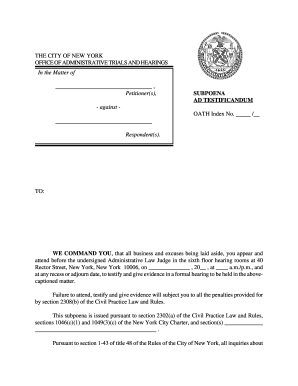
The New York Information Subpoena with Restraining Notice is a legal document used by judgment creditors to enforce money judgments in New York's Civil Court.
pdfFiller scores top ratings on review platforms




It's still very new but I have high hopes
EASY TO USE, TRULY ALLOWS ONE TO EDIT PDFS. I WOULD LOVE TO SEE MORE FONTS AND THE ABILITY TO SET THE FONT SIZE MANUALLY, AND SMALLER THAN SIZE 8. OTHER THAN THAT, GREAT, USEFUL APP.
Who needs Subpoena Restraining Notice?
Explore how professionals across industries use pdfFiller.

Subpoena Restraining Notice is needed by:
-
Judgment Creditors seeking to enforce a court judgment
-
Legal professionals representing clients involved in civil litigation
-
Individuals needing to compel testimony and document submission
-
Judgment Debtors wanting to understand their rights and obligations
-
Those involved in financial disputes or debt collections
Comprehensive Guide to Subpoena Restraining Notice
What is the New York Information Subpoena with Restraining Notice?
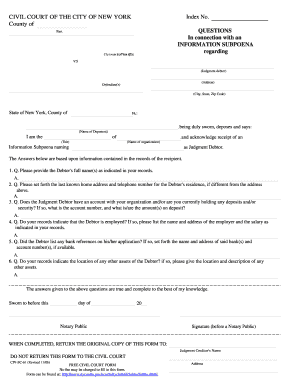
The New York Information Subpoena with Restraining Notice is a legal form used in the enforcement of money judgments, aimed at compelling a witness to provide information under oath. It plays a critical role in New York civil law by facilitating the recovery of debts through effective information gathering. This form includes a restraining notice that impacts judgment debtors by preventing them from transferring or otherwise disposing of assets until the judgment is resolved.
Additionally, the document must bear the signature of the judgment creditor, as this is essential for its validity and enforcement. Understanding this is crucial for any party involved in judgment recovery processes in New York.
Purpose and Benefits of the New York Information Subpoena with Restraining Notice
This form is essential for judgment creditors as it supports them in enforcement actions against debtors. By using the Information Subpoena with Restraining Notice, creditors can gain pertinent information that assists in tracing and recovering assets.
Some benefits of this form include:
-
Preventing asset transfer that could hinder recovery efforts.
-
Facilitating legal proceedings in New York civil court effectively.
Key Features of the New York Information Subpoena with Restraining Notice
The New York Information Subpoena with Restraining Notice has several unique attributes, including various fillable fields such as 'Index No.', 'Address:', and 'Dated:'. These features streamline the process for users.
Moreover, the form encompasses:
-
Checkboxes for quick selections and user input.
-
Specific sections that require signatures.
-
Explicit restrictions imposed on the judgment debtor.
Who Needs the New York Information Subpoena with Restraining Notice?
This form is designed primarily for judgment creditors, who utilize it to enforce legal rights against judgment debtors. Scenarios often arise where creditors seek to recover money due from debtors and thus require this specific form.
Additionally, this form serves legal teams and attorneys who represent creditors, making it a significant tool in their legal arsenal.
When and How to File the New York Information Subpoena with Restraining Notice
Filing the New York Information Subpoena with Restraining Notice requires careful timing, typically done shortly after a judgment is entered. Accuracy is crucial during this process to avoid any potential delays. Here’s a step-by-step guide:
-
Complete the form with all necessary details.
-
Verify that the judgment creditor’s signature is present.
-
Submit the form through the appropriate channels.
Required Information and Supporting Documents for Submission
To effectively complete the New York Information Subpoena with Restraining Notice, gather the following documentation:
-
Personal details of the judgment creditor and debtor.
-
The case number associated with the judgment.
-
Any evidence relevant to the debt in question.
Reviewing all supporting documents before submission is essential to ensure a smooth filing process.
How to Fill Out the New York Information Subpoena with Restraining Notice Online
Filling out the Information Subpoena with Restraining Notice online offers convenience and efficiency. Follow this step-by-step approach:
-
Access the form online via a suitable platform.
-
Fill in the form’s required fields using clear and concise information.
-
Utilize editing and eSigning features to finalize the form.
Ensure that security measures are in place throughout the process to protect sensitive data.
Submission Methods for the New York Information Subpoena with Restraining Notice
There are multiple methods to submit the New York Information Subpoena with Restraining Notice, including:
-
In-person submission at the relevant legal authority.
-
Mailing the completed form to the appropriate office.
After your submission, be sure to track the status of your form for confirmation and to understand the next steps in the process.
Handling Amendments and Corrections for the New York Information Subpoena with Restraining Notice
Errors may occur after the New York Information Subpoena with Restraining Notice has been submitted, making it crucial to know the amendment process. To amend the form, consider the following steps:
-
Contact the court to inquire about the amendment procedure.
-
Submit the corrected form following their guidelines.
Timeliness is vital when making corrections to prevent complications, such as rejection of the submission. Common rejection reasons include incomplete information or missing the judgment creditor’s signature, so review the form carefully.
Enhance Your Experience with pdfFiller for the New York Information Subpoena with Restraining Notice
Utilizing pdfFiller can significantly enhance your experience when handling the New York Information Subpoena with Restraining Notice. Its features offer:
-
User-friendly document management capabilities.
-
Robust eSigning tools for secure signing processes.
-
Software compliance with necessary security standards, ensuring data protection.
With these advantages, users can confidently manage their legal documents efficiently and securely.
How to fill out the Subpoena Restraining Notice
-
1.Access the New York Information Subpoena with Restraining Notice form on pdfFiller by searching under legal forms or using the provided link.
-
2.Open the form. You will see fillable fields such as 'Address:', 'Index No.', and 'Dated:'.
-
3.Before filling out the form, gather necessary details, including case information and judgment details.
-
4.Click on each field to input information. For address, type in the judgment creditor's current address.
-
5.Enter the index number related to your case in the specified field.
-
6.Fill in the date when the document is prepared and executed in the 'Dated:' field.
-
7.Make sure to check the box for the signature of the judgment creditor in the provided section.
-
8.Review each section of the form to ensure no fields are left blank and all information is accurate.
-
9.Once completed, review the entire document for clarity and accuracy before finalizing.
-
10.Save your work regularly by clicking on the save option available in pdfFiller.
-
11.After completing and reviewing the form, download it in your preferred file format or submit it directly through pdfFiller.

Who is eligible to use the New York Information Subpoena with Restraining Notice?
Eligible individuals include judgment creditors who have won court-ordered monetary judgments and need to compel a debtor for information.
Are there deadlines for submitting this subpoena?
While specific deadlines may vary, evidence gathering and submission should generally occur promptly to ensure compliance with court orders.
What are the submission methods for the Information Subpoena?
You can hand-deliver, mail, or, in some cases, electronically file the Information Subpoena with the appropriate court handling your case.
What supporting documents do I need for the Information Subpoena?
While the subpoena itself is the primary document, have copies of the judgment and case documentation handy to reference during completion.
What common mistakes should I avoid when filling out the subpoena?
Ensure all fields are completed accurately, especially signature fields, as incomplete forms may be rejected by the court.
What is the processing time for this form?
Processing times may vary by court; generally expect a few days to several weeks for court review, depending on the court's schedule.
What if I need to modify the Information Subpoena after filling it out?
You can make modifications in pdfFiller before submission by reopening the saved document to edit any necessary fields.




Get the latest insights from our blog


If you believe that this page should be taken down, please follow our DMCA take down process
here
.
This form may include fields for payment information. Data entered in these fields is not covered by PCI DSS compliance.